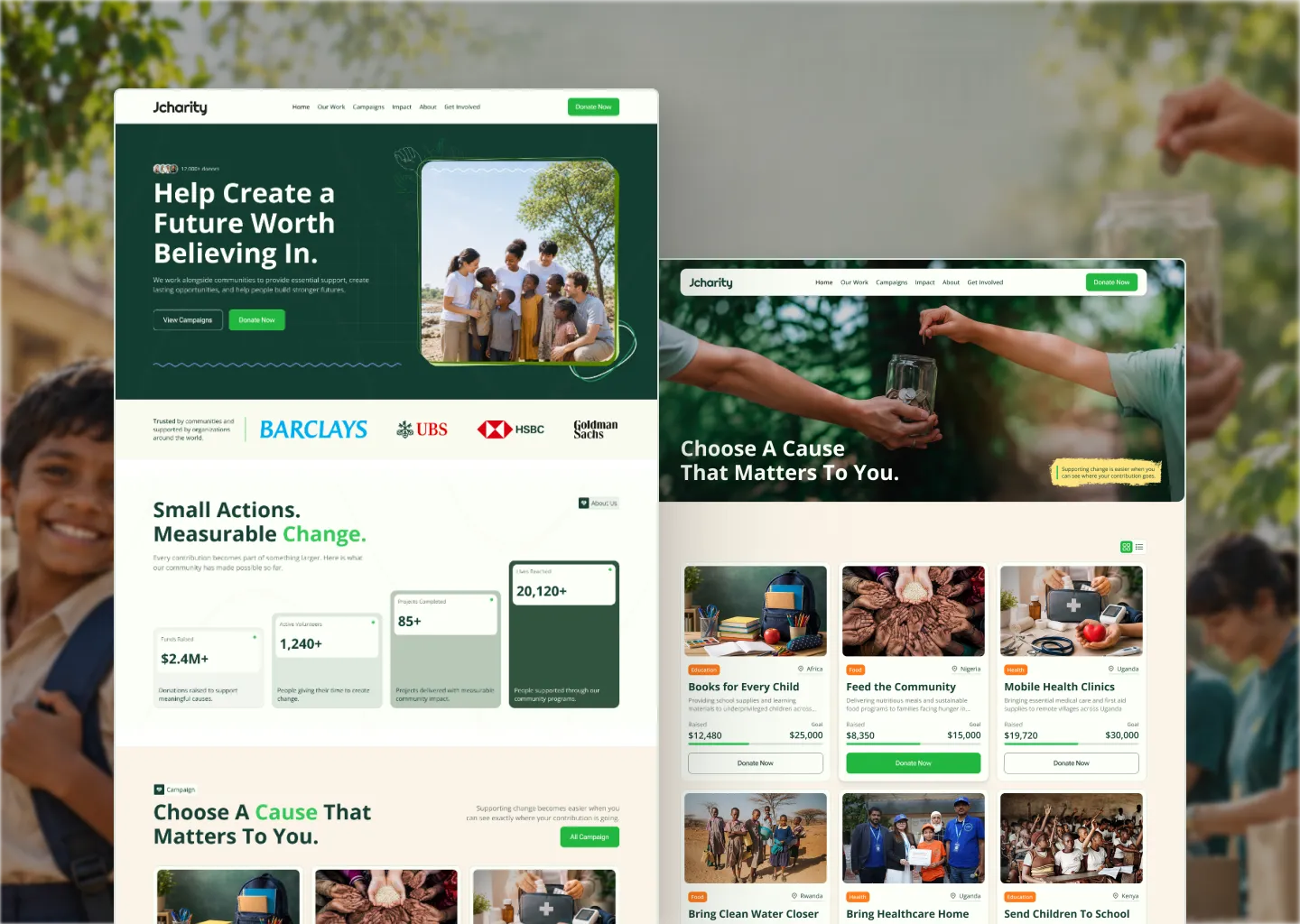
Charity is a WordPress theme for nonprofits, charities and fundraising organisations: campaigns, donations, recurring giving, events and volunteers, all in one place. Donations run through WooCommerce, so every gift is a real order paid with any WooCommerce payment gateway. The template builder and all 57 widgets are built into the theme and work with Elementor Free. You don’t need Elementor Pro.
## Features
Theme Builder: Build your header, footer, single post, single product, cart, checkout, order received, my account, archive, campaign, event, blog, search and 404 pages as Elementor templates. Display conditions with include and exclude rules decide where each one shows, and the more specific rule wins, so a single campaign or page can override the site-wide default.
Donations through WooCommerce: The Donate popup, the campaign Donate Now button and the Donation Amount Selector all send donors to WooCommerce checkout with the amount they chose. When the order completes, the campaign’s raised total and donor count update on their own. You can set a minimum donation, offer an optional “cover the transaction fee” checkbox, and let donors give anonymously.
Donate popup and checkout: Preset amounts, a custom amount, a One Time / Monthly toggle and an impact line that recalculates as the amount changes (“$250 can provide clean water for 2 people for a month”). The Checkout widget adds a Choose Your Donation card so donors can change the amount or frequency without leaving the page, and the Place Order button shows the total (“Confirm Donation $50”). Donation Form settings let you hide, relabel and reorder the billing fields.
Campaigns: A Campaign post type with goal, amount raised, donor count, deadline, categories and locations, plus story sections (The Problem, Our Solution, How Donations Help), gallery, video, impact stats and an urgent flag. Campaign Grid, Donation Progress Bar, Campaign Status and Campaign Field widgets display them, and a campaign’s featured image can serve as a section background.
Recurring giving: Connect Subscriptions for WooCommerce (free) or WooCommerce Subscriptions for real monthly billing. Without either, Pledges email donors a reminder on a monthly, quarterly or yearly schedule, and nothing is ever charged automatically.
Donor management: A Donors screen built live from your orders, with Major Gifts, Lapsing and New tabs, saved segments, tags, private notes, duplicate detection and merging, and a donor overview card on the dashboard. Donations, donors, campaigns and volunteers export to CSV.
Receipts: Order emails switch to donation wording when every item in the order is a donation, while shop purchases keep WooCommerce’s normal wording. Donors can open a receipt from their Donation History and print it or save it as a PDF.
Events and volunteers: An Event post type with date, time, location and registration link, plus Event Calendar and Event Grid widgets and event categories. The Volunteer Application Form can be tied to a specific event, and you review applications under Charity – Volunteers.
Transparency widgets: Donation Chart (monthly or yearly, donations received against funds used for programmes), Fund Allocation, Impact Counter, Donor Statistics, Donor Count, Recent Donors and Top Donors. Program Spending lets you enter your monthly spending figures yourself.
Donor accounts: A Login / Register widget with optional Google Sign-In (using your own Google OAuth credentials), optional email verification, and two-factor authentication with any authenticator app. My Account covers profile, security, notification preferences and donation history, and switching a notification off really does stop that email.
Widgets and blocks: 57 Elementor widgets across fundraising, events, account, checkout and content, including a blog grid and slider, testimonials slider, timeline, team members, partners, marquee, accordion and a contact form that saves every submission before sending it. The Widget Manager turns off widgets you don’t use so they never load. Six Gutenberg blocks (Campaign Card, Campaign Grid, Donate Button, Donation Amount, Recent Donors, Urgent Help) give the same output in the block editor.
Customizer options: Header (logo, menu, CTA button, account button), footer (logo and tagline, payment badges, menu columns, trust and credibility, bottom bar), typography with seven self-hosted font families, blog archive and single post options, and a Fundraising panel for the donate button, donate popup, sticky donate bar, blog donate CTA and urgent banner. There’s also a page preloader.
Easy setup: The demo package includes all 100 demo images, so the import doesn’t rely on downloading anything from another server. After import, the theme sets up the Elementor kit, menus, front page, logo and permalinks for you. A setup checklist on the Charity dashboard shows what’s still missing, the theme outputs schema.org structured data, and it’s RTL and translation ready.
Installation
Go to Appearance > Themes > Add New > Upload Theme.
Upload ‘charity.zip’ from your download package, then click Install Now and Activate.
Go to Charity > Demo Content. In the Plugins card, click Install All to install and activate Elementor, WooCommerce and One Click Demo Import. Tick Subscriptions for WooCommerce as well if you want monthly donations. If your Elementor is older than 4.3.2, the card asks you to update it first.
Click Go to Import Demo Data, then Import. Leave the tab open until it finishes.
Open Campaigns > All Campaigns and replace the demo campaigns with your own.
Set your currency and payment methods in WooCommerce > Settings, then check Charity > Donation Settings for the minimum amount and the cover-the-fee option.
If any imported page returns a 404, go to Settings > Permalinks and click Save once.
## Requirements
WordPress 6.2+, PHP 7.4+ (8.0 or newer recommended), Elementor 4.3.2+ and WooCommerce, both free. One Click Demo Import (free) is used for the demo import. Subscriptions for WooCommerce (free) is optional and only needed for monthly donations.
Licensing
One regular license covers one website (one domain, including its subdomains). Building a second site means a second license. You can run a staging or development copy alongside your live site as long as it isn’t publicly serving as a second production website. Full terms are on the item’s license page.