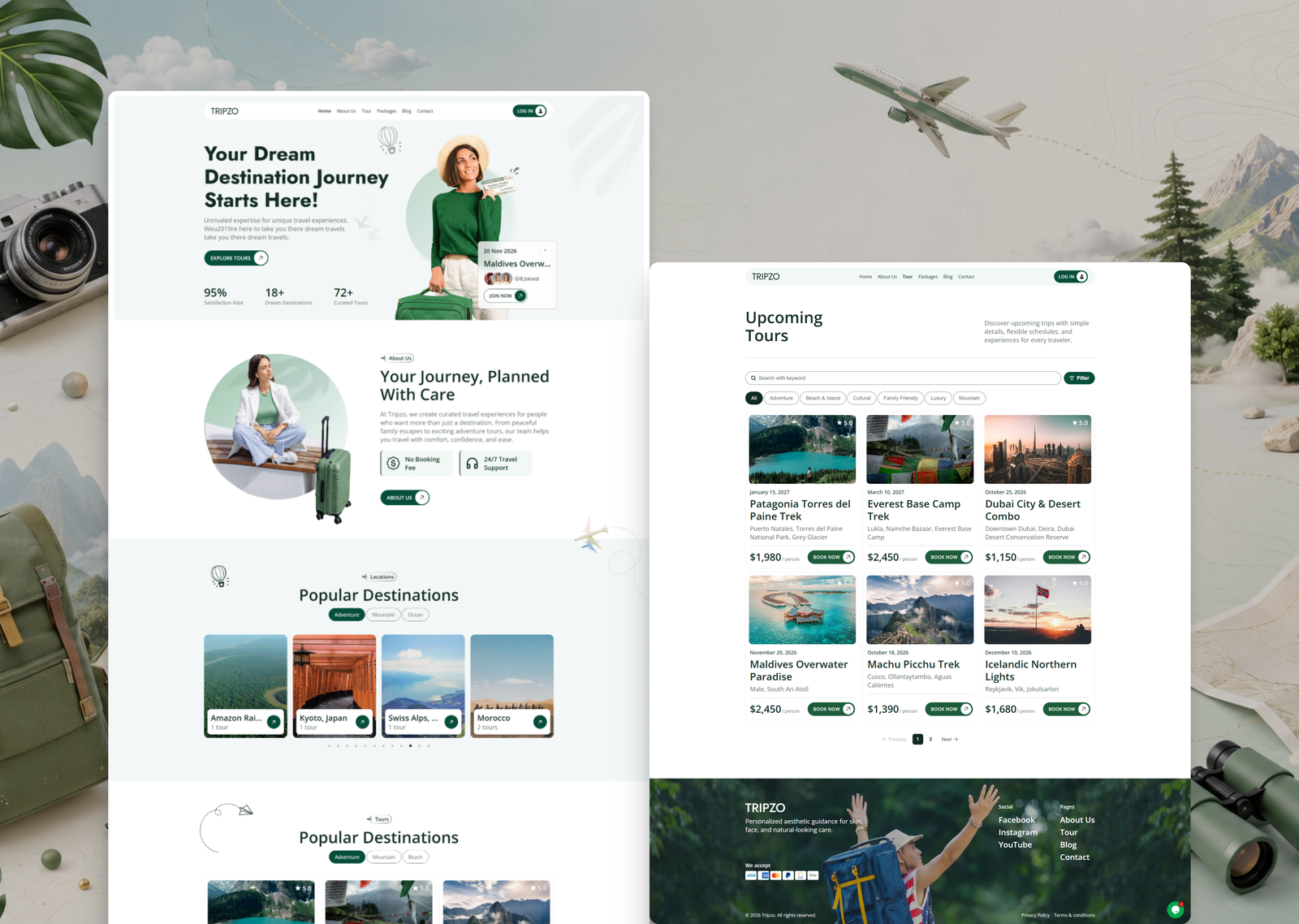
Tripzo is a WordPress theme for selling tours and travel packages: day trips, multi-day treks, city walks, holiday packages and any trip with dates and travellers. Booking, checkout, customer accounts and the template builder are all part of the theme, and you design everything in Elementor Free. You don’t need Elementor Pro.
Features
Theme Builder: Build your header, footer, single tour and package pages, blog archive, tour archive, single post, search results, 404, checkout, order received and My Account pages as Elementor templates. Display conditions decide where each one shows, and a Custom template type covers anything else.
Tours & packages: Tours hold the main listing: pricing, itinerary, amenities, gallery, what’s included and excluded, and policies. Packages are bookable versions of a tour with their own price, add-ons and images. Tour Categories, Tour Locations and Package Types each get their own admin screen. Tour Defaults pre-fills every new tour with your usual policies, amenities and pricing, and past tours can be hidden from listings automatically.
Tour widgets: Booking form, price, pricing details, itinerary, amenities, includes/excludes, gallery, glass slider, tour slider, packages, info list, meta field, badge, short description, tour search, tour filter, location slider, showcase and a Write Review button.
Booking & checkout: Every booking goes through one WooCommerce product that the theme manages for you, so there’s no per-tour product setup. The two-column Checkout widget runs on WooCommerce’s own checkout hooks, so your payment gateways, taxes and coupons keep working. Add-ons, infant and private pricing, and promo codes are handled per booking. A Checkout Fields screen lets you show, hide, require, relabel, reorder and resize fields, or add your own fields, which are saved to the order. Guest checkouts can create a customer account automatically.
Seat capacity: Set how many travellers a tour can take. When a tour is full, the booking button can switch to a disabled “Fully Booked” state before the customer clicks it.
Changes & cancellations: Customers can ask to change their date or add-ons from their account. The cancellation policy engine handles deadlines, refund tiers and admin approval, and charges the difference when a change raises the total. All bookings are listed under Tripzo → Bookings.
Customer accounts: A full My Account dashboard replaces WooCommerce’s default page. It includes Profile Settings, My Bookings split into upcoming, completed and cancelled, Booking Details, a printable invoice and Security Settings. On mobile the menu becomes a bottom tab bar, and you can turn that on for tablets too.
Sign-in & security: Email verification, two-factor authentication through an authenticator app with QR setup, a login activity log, and optional Google Sign-In that also appears in the checkout login form.
Reviews: Reviews are linked to real bookings, and you choose who can post: customers whose tour is completed, customers as soon as they book, or any logged-in user. Customers can write a review from the tour page or straight from My Bookings.
Live chat: The Live Chat link in the account Help card opens Tawk.to, which the setup screen offers to install, or Crisp, Tidio, Zendesk, Intercom, Drift, HubSpot or LiveChat if one of those is installed instead. You can switch the link off when you only want the floating chat bubble.
Contact form: Build contact forms in Elementor with text, email, textarea, date and checkbox fields, required-field checks, honeypot and rate-limit spam protection, and email notifications. Entries are saved under Tripzo → Contact.
General widgets: Button, accordion, dual-color heading, rotating text, marquee, content slider, testimonials, team, timeline, blog grid, badge, inline icon text, nav menu, term list, plus post title, content, image, terms and comments widgets. Widget Manager lets you switch off any of the 48 widgets you don’t use, so they never load.
Customizer & site settings: Google Fonts typography; header logo, menu, Book Now button and account button; footer logo and tagline, payment badges, menu columns and bottom bar; blog archive and single post options; and a preloader under Site Settings. Tours, packages and posts output schema.org structured data, CSS and JS are minified, and the theme is RTL-ready and translation-ready.
Installation
Go to Appearance > Themes > Add New > Upload Theme.
Upload tripzo.zip from your download package, then click Install Now and Activate.
Go to Tripzo > Demo Content. Use the Required Plugins card to install and activate Elementor and WooCommerce. One Click Demo Import and Tawk.to Live Chat are selected by default and installed by Install All.
Click Import Demo Data and leave the tab open until it finishes.
Open Tour Manager > All Tours and replace the demo tours, prices and images with your own.
Set your currency, taxes and payment methods in WooCommerce > Settings.
If any imported page returns a 404, go to Settings > Permalinks and click Save once.
Requirements
WordPress 6.2+ and PHP 7.4+. Elementor and WooCommerce are both free. One Click Demo Import (free) is only needed to import the demo.
Licensing
One regular license covers one website (one domain, including its subdomains). Building a second site means a second license. You can run a staging or development copy alongside your live site as long as it isn’t publicly serving as a second production website. Full terms are on the item’s license page.